
The following is a step-by-step instruction guide on how to turn on end-to-end encryption.
This feature is not available with all subscriptions - check with your account admin if you don't have access to this feature.
End-to-end encryption can be turned on during your call.
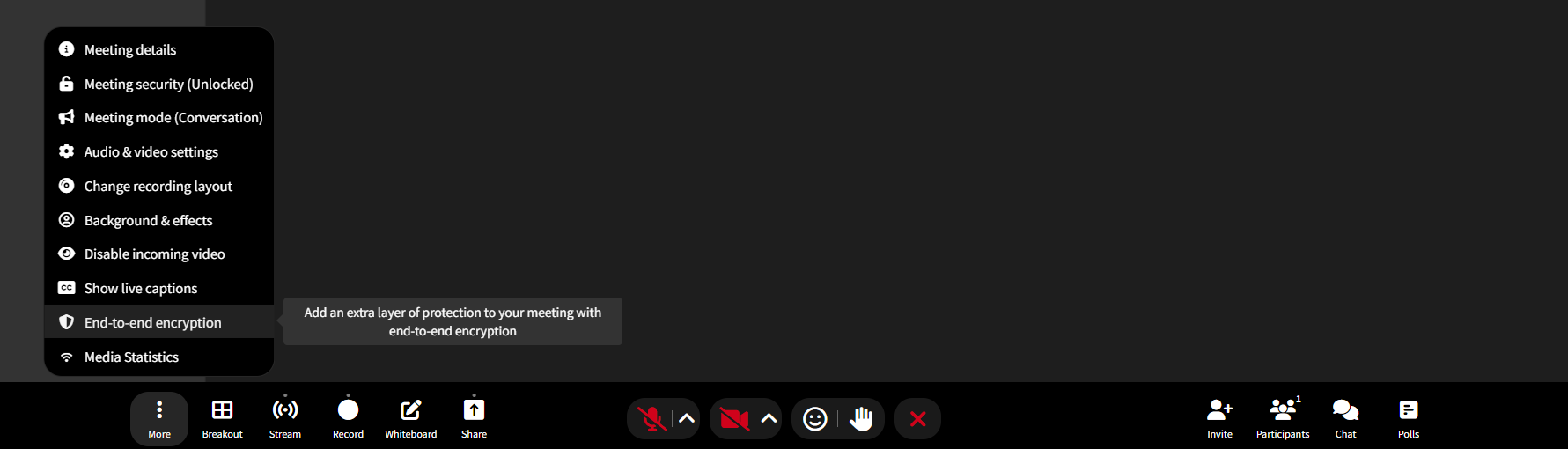
1) During the call, on the feature bar at the bottom of the in-call page, click on the ... More button
2) Once you click that button multiple tabs will populate. Please click on End-to-end encryption.
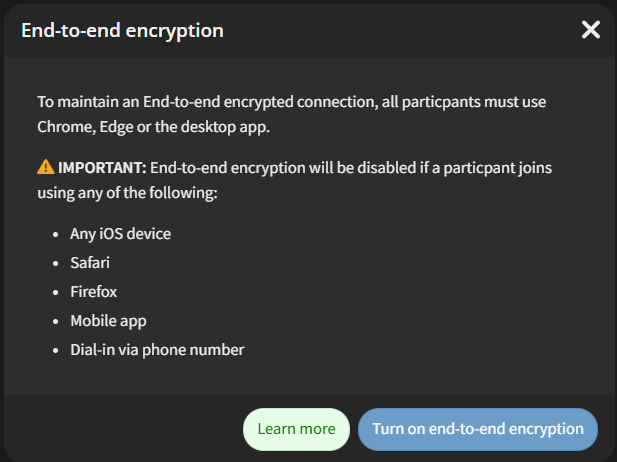
3) A notice will display, indicating that end-to-end encryption can only apply on Chrome, Edge, or the desktop app. Please click on Turn on end-to-end encryption to begin.
4) When enabled, a pop-up message will read "end-to-end encryption has been turned on." There will also be an indicator on top of the incall page.
5) To turn it back off, please repeat the steps More --> End-to-end encryption ---> Turn off End-to-end encryption. A pop-up message will read "end-to-end encryption has been turned off."